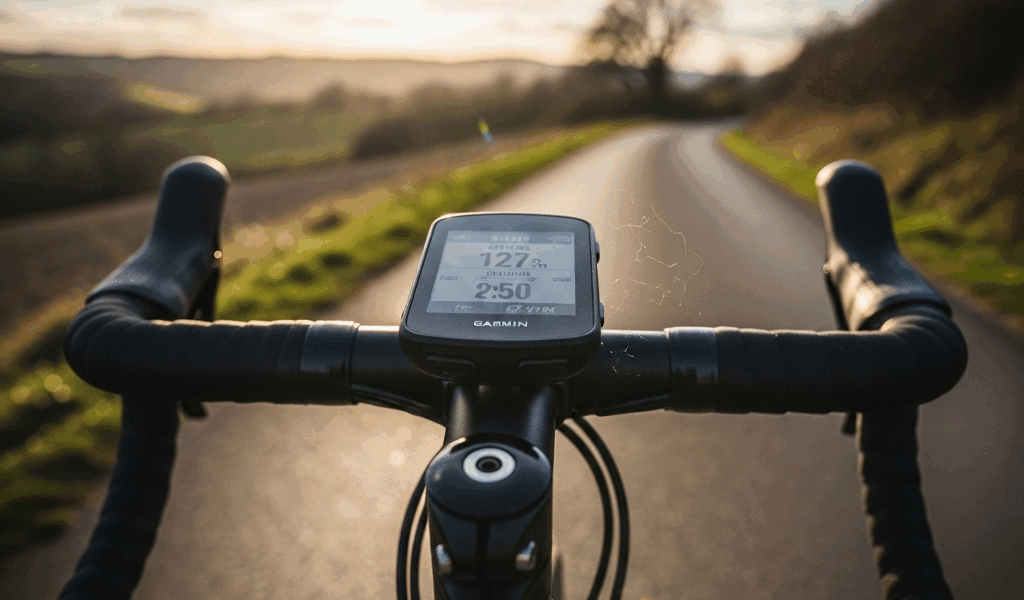
Quick verdict: buy the Garmin Edge 540 if you prefer button-only control or it is meaningfully cheaper. Choose the Edge 840 if you frequently pan and zoom maps, enter destinations on the device, or want twice the storage. The 840 has both a touchscreen and buttons, so it does not force you to use touch.
The two computers share nearly all of their training, navigation, sensor, and safety features. However, touchscreen control is not their only difference. Garmin’s specifications also list 32 GB of storage for the 840 versus 16 GB for the 540, along with a small weight difference. And because Garmin released the Edge 550 and 850 in September 2025, the 540 and 840 now make the most sense as discounted new, refurbished, or used-value choices.
Last reviewed August 2026. This comparison uses Garmin’s published specifications and manuals; prices and stock change frequently.
Garmin Edge 540 vs 840 at a glance
| Feature | Edge 540 | Edge 840 |
|---|---|---|
| Control | Buttons only | Touchscreen plus buttons |
| Storage | 16 GB | 32 GB |
| Weight | 80.3 g | 84.8 g |
| Display | 2.6-inch, 246 × 322 color display | Same |
| Dimensions | 57.8 × 85.1 × 19.6 mm | Same |
| Claimed demanding-use battery | Up to 26 hours | Up to 26 hours |
| Water rating | IPX7 | IPX7 |
| Solar version | Available | Available |
| Best fit | Button-first riders and value buyers | Riders who interact with maps often |
Those figures come from Garmin’s official product comparison. Battery life is a maximum under defined conditions, not a promise for every ride.
The differences that actually matter
1. The Edge 840 adds touch without removing buttons
The Edge 540 is operated entirely with physical buttons. That can be reassuring with full-finger gloves, on rough ground, or when you want a control you can identify by feel. It also eliminates accidental screen gestures.
The Edge 840 retains physical controls and adds a touchscreen. Touch is most valuable when navigating: dragging a map, zooming, selecting a field, or moving through menus is more direct than repeated button presses. You can still use the buttons when conditions or gloves make touch inconvenient. This makes the 840 more flexible rather than simply “touch-only.”
If you mostly follow a preloaded route and glance at data pages, the 540’s buttons are rarely a major compromise. If you regularly explore unfamiliar roads or change settings on the unit, the 840’s interface is the more convenient one.
2. The Edge 840 has twice the storage
Garmin lists 32 GB for the Edge 840 and 16 GB for the Edge 540. Both support Garmin Cycle Maps, Trailforks data, up to 100 courses, and up to 200 hours of activity history. For many riders, 16 GB is enough. The extra capacity matters more if you keep multiple large map regions installed or want more room before managing files.
Storage does not make the 840 faster on its own, and it does not double the number of rides you need to save. Treat it as useful headroom, not a reason by itself to replace a working 540.
3. The weight difference is real but negligible
The standard Edge 540 weighs 80.3 g and the standard Edge 840 weighs 84.8 g—a difference of 4.5 g. That is measurable but unlikely to influence a buying decision. Their case dimensions and screen size are identical, and both use Garmin’s quarter-turn mounting system.
4. Price is the practical deciding factor
Retail pricing fluctuates now that both models have successors. Compare the actual price of the same version—standard against standard or Solar against Solar—rather than relying on the original list-price gap. A discounted 840 can be the better value than a full-price 540, while a large discount on the 540 makes touch harder to justify.
A sensible rule: if the 840 premium feels small relative to your total bike and navigation budget, its easier map interaction and additional storage are worth having. If the gap is large and you already prefer buttons, put the savings toward sensors, lights, or other equipment you will use on every ride.
What the Edge 540 and 840 share
The core riding experience is much more alike than different. Both models provide multi-band GNSS, turn-by-turn navigation, ClimbPro, cycling dynamics, training status and load features, Power Guide, stamina estimates, structured workouts, smart-trainer control, and compatibility with common ANT+ and Bluetooth sensors. They also support incident detection and connected features when the required phone, account, network connection, and contacts are configured.
Both use the same 2.6-inch transflective color display. It prioritizes outdoor readability and battery endurance rather than the vivid appearance of a phone or the newer Edge 550/850 screen. Both are rated IPX7, but water resistance is not the same as permission to charge a wet device or expose it unnecessarily to high-pressure water.
If you are building a training setup, start with the data you will actually act on. Our guide to cycling cadence explains how cadence numbers translate to real riding, while our roundup of cycling apps covers the phone and platform side of route planning and activity analysis.
Standard versus Solar models
Garmin sold both computers in standard and Solar versions. The Solar models add solar-charging material around the display; they are not separate generations and do not change the central 540-versus-840 control difference.
Garmin’s published battery scenarios list up to 26 hours for demanding use on the standard models. Under its specified light conditions, the Solar versions can extend that figure to as much as 32 hours. Battery-saver figures are higher, but navigation, brightness, sensors, temperature, satellite mode, phone connections, device age, tree cover, and available sunlight all affect real results. Compare the same battery mode and read the assumptions behind any headline number.
Solar is most compelling for long daylight events, touring, or riders who regularly approach the base model’s range. For ordinary rides followed by convenient charging, a discounted standard unit is often better value.
Should you buy a 540 or 840 after the Edge 550 and 850?
Garmin introduced the Edge 550 and Edge 850 in September 2025. The newer pair adds a brighter 2.7-inch display and newer features; the 850 remains the touch-enabled model and also adds items such as a speaker, bike-bell function, Garmin Pay, and on-device course creation. Garmin rates the newer devices for up to 12 hours of demanding use or 36 hours in battery-saver mode.
That does not make a 540 or 840 obsolete. The older pair can be attractive when:
- the discount is substantial;
- you value their longer published demanding-use battery figure;
- you do not need the brighter new display or 850-specific conveniences; or
- you find a well-kept used unit at a fair price.
Buy the newer generation if its display and added features matter enough to justify the price. Buy the 540/840 generation for value, not because a seller describes it as Garmin’s newest line.
Which one should you choose?
Choose the Edge 540 if:
- you actively prefer physical buttons;
- you normally load a route before riding and rarely manipulate maps;
- 16 GB is sufficient for the map regions you use;
- it is substantially cheaper than a comparable 840; or
- you want the lighter of the two, even though the difference is only 4.5 g.
Choose the Edge 840 if:
- you pan, zoom, or browse maps frequently;
- you want touch convenience while retaining buttons;
- you keep several map regions and value 32 GB of storage; or
- the real-world price premium is modest.
Our default recommendation: the Edge 840 is easier to live with for navigation-heavy riding. The Edge 540 is the smarter value when its discount is meaningful or buttons are a positive preference rather than a compromise.
Used Garmin Edge buying checklist
A used 540 or 840 can be excellent value, but inspect the unit rather than buying from the model name alone:
- Check the rear quarter-turn mount tabs for cracks or looseness.
- Test every button; on an 840, test touch response across the entire screen.
- Inspect the USB-C port and confirm that charging and computer detection work.
- Run a GPS activity and compare battery loss over a meaningful period.
- Look for display damage, moisture signs, case separation, or swollen areas.
- Confirm that Wi-Fi, Bluetooth, and at least one sensor pairing work.
- Have the seller remove personal data, then perform a factory reset and update the firmware.
- Verify which mount, cable, case, and sensors are actually included.
For a Solar unit, do not assume that age or poor battery health will be overcome by sunlight. Solar charging extends runtime under suitable conditions; it is not a substitute for a healthy internal battery.
Frequently asked questions
Is the Garmin Edge 840 just a touchscreen Edge 540?
No. Touchscreen control is the biggest difference, but Garmin also specifies 32 GB of storage for the 840 versus 16 GB for the 540, and the 840 weighs 4.5 g more. Their dimensions, display resolution, core features, and standard battery claims are otherwise very similar.
Can the Edge 840 be used with buttons?
Yes. The Edge 840 includes physical buttons as well as its touchscreen. That lets you use buttons with gloves or whenever touch is inconvenient.
Do the Edge 540 and 840 have the same battery life?
Garmin gives both standard models the same maximum figures in equivalent usage scenarios, including up to 26 hours in demanding use. Solar versions can extend runtime under Garmin’s specified light conditions. Actual endurance varies with settings, sensors, navigation, temperature, connectivity, sunlight, and battery age.
Are the Edge 540 and 840 still worth buying?
Yes, when priced appropriately. They are the previous generation after the 2025 launch of the Edge 550 and 850, so compare discounts, condition, warranty, and the newer models’ features before purchasing.


Leave a Reply